Capabilities & profiles
Three distinct ideas shape every slot in hal0, and keeping them separate is what makes the system tractable: capabilities describe what you want a slot to do, profiles describe how it runs, and the device describes where it runs. They compose — a capability points at a slot, the slot picks a profile, and the profile is keyed to a device.
Capabilities: what a slot does
Section titled “Capabilities: what a slot does”A capability is an overlay the dashboard uses to group related slots under one operator-friendly idea. Rather than make you hand-configure each underlying slot, you pick a capability and its child, and hal0 reconciles the real slot for you. The capability groups are:
| Capability | Children → underlying slot |
|---|---|
embed | embed → embed, rerank → embed-rerank |
voice | stt → stt, tts → tts |
img | img → img |
vision | vision → vision |
Chat is deliberately not a capability group — it lives in the dedicated chat slot and is configured directly, not through the capability overlay.
The selected capabilities are stored in capabilities.toml. When you apply a
change, the orchestrator computes one atomic change set across both
capabilities.toml and the affected slot TOML — they’re written together so the
two can never drift mid-apply — and only then drives the slot lifecycle:
turning a capability on loads its slot, turning it off unloads it, and changing
the model or backend swaps it. On first boot, hal0 seeds capabilities.toml
from whatever the slots already declare, so the overlay reflects reality
immediately.
Profiles: how a slot runs
Section titled “Profiles: how a slot runs”A profile is a reusable container-runtime template. It bundles the container image, a set of bench-tuned launch flags, and an MTP (speculative decoding) toggle. A slot references a profile by name; the profile supplies everything about how to run except the model, context size, and port — those belong to the slot. This split means many slots can share one tuned profile, and you can re-tune a profile once for every slot that uses it.
hal0 ships seed profiles so a fresh install is immediately usable:
| Profile | Targets | Purpose |
|---|---|---|
rocm | GPU (ROCm) | MoE / agent models, FP4, no MTP (larger q8 KV) — the gpu-rocm default |
rocm-dnse | GPU (ROCm) | Dense models with MTP speculative decoding (q8 KV) |
rocm-moe | GPU (ROCm) | MoE models with MTP speculative decoding (q8 KV) |
vulkan | GPU (Vulkan) | Standard Vulkan path and fallback, now with symmetric q8 KV |
cuda | GPU (CUDA) | NVIDIA GPUs via upstream llama.cpp CUDA — experimental, the gpu-cuda default |
embed | GPU (ROCm) | Dedicated embeddings lane (--embedding, wide ubatch for long inputs) |
rerank | GPU (ROCm) | Dedicated reranking lane (--reranking) — always a separate instance from embed |
flm | NPU | FLM inference on the NPU |
tts | CPU | Text-to-speech (Kokoro) |
tts-qwen3 | GPU (ROCm) | Text-to-speech (Qwen3-TTS) — the GPU engine behind the voice.tts capability switch |
cpu-llm | CPU | CPU-only chat/coder — the cpu device default |
comfyui | image | Image generation (ComfyUI) |
embed and rerank are deliberately separate profiles/slots rather than one
server handling both — combining --embedding and --reranking on a single
llama-server instance produces all-zero scores.
Seed profiles are virtual
Section titled “Seed profiles are virtual”Seed profiles live in code, not in /etc/hal0/profiles.toml. On every
load, hal0 overlays the code definition of each seed name over whatever is on
disk — the code definition always wins, even over a stale on-disk copy — and
if profiles.toml is absent entirely, the seeds are still returned in memory,
so the profile catalog is never empty. Saving the catalog back out strips
every seed-named key before writing, so a seed can never accidentally get
pinned to a stale on-disk copy. The payoff: a bench re-tune to a seed (new
flags, a bumped toolbox image digest) reaches every existing install
automatically on the next load — no reinstall and no per-install
re-materialization step.
Seed profiles are immutable through the API too — updating or deleting a
profile whose name matches a seed is rejected outright. The only way to
customise one is to clone it: the dashboard’s Profiles tab turns “Edit” into
“Edit a copy” for a seed, forking a <seed>-custom profile (with
cloned_from recording the original) that you’re then free to tune; Delete
stays disabled on the seed itself. Under the hood this is an ordinary
POST /api/profiles under the new name.
Each profile is also classified into a runtime family (llama-server, FLM, Kokoro, Qwen3-TTS, or ComfyUI) that determines which slot types it can serve.
Profiles are also portable: any profile can be exported to a
self-contained, checksummed .hal0profile.json envelope and imported on
another host — the same sharing model stacks use.
See Devices, providers &
profiles
for the routes and MCP tools.
A registry model can also carry a preferred profile (defaults.profile)
that a slot adopts automatically on creation and on every model swap, gated on
device/type compatibility — see Devices, providers &
profiles
for the exact rule.
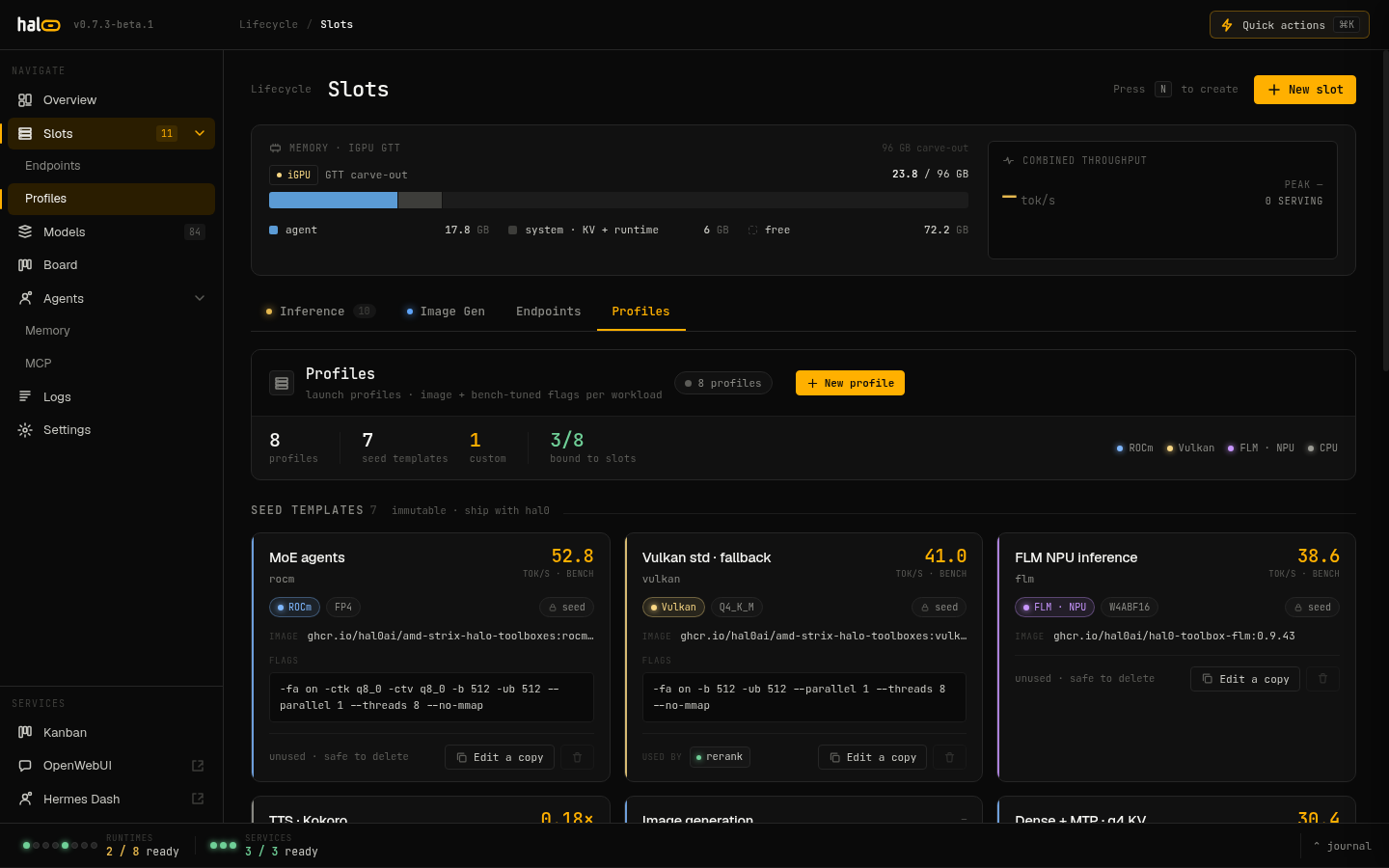
The Profiles tab — seed profile cards with bench metrics, device class chips, and the clone affordance for creating custom profiles.
Flag precedence: how a launch command is assembled
Section titled “Flag precedence: how a launch command is assembled”A container slot’s actual launch command is built from several layers,
concatenated in a fixed order and then deduplicated last-wins per flag
(short and long spellings of the same flag — -b/--batch-size,
-ngl/--n-gpu-layers, -ctk/--cache-type-k, and friends — are treated as
the same key; --lora, --draft-model, and --override-kv are appended,
never deduped, since llama-server treats repeats of those additively):
- base —
--host/--port/--model/--alias/--ctx-size, always present. - profile — the profile’s
flags(with the MTP bundle merged in, see below). - model defaults — the registry model’s
defaults.extra_args(plus-nglfromdefaults.n_gpu_layers), with the model’s family default (next section) prepended — so a family override beats the profile, but the model’s ownextra_argsstill wins over the family within this same layer. - chat template / mmproj —
--chat-template-file,--mmproj, resolved from the slot and model. - slot overrides — currently just a slot-level
n_gpu_layers. [server].extra_args— hand-authored on the slot itself, always wins last.
The slot Edit drawer’s resolved command panel shows the fully assembled
argv with a per-flag provenance badge, backed by GET /api/slots/{name}/resolved
— the same resolver drives both this preview and the actual launch, so what
you see is what runs.
FAMILY_DEFAULTS — pinning quirky model architectures
Section titled “FAMILY_DEFAULTS — pinning quirky model architectures”Some model architectures need flags no profile should reasonably have to
know about. FAMILY_DEFAULTS is a small, code-only table — virtual like the
seed profiles, never persisted — keyed on model family (detected from a token
scan of the model’s id/filename) that layers architecture-specific overrides
into the model-defaults layer above. Today it has one tenant:
gemma → -ctk f16 -ctv f16 --cache-reuse 0Gemma’s interleaved sliding-window attention regresses under quantized KV
cache, so any Gemma model on any q8-KV profile is pinned back to f16
KV with cache-reuse disabled automatically — no per-slot opt-in needed. This
is what makes it safe for the vulkan seed profile to default to symmetric
q8 KV: without the Gemma guard, a Gemma model on vulkan would silently
regress in prompt-processing speed.
MTP: a model × profile × slot decision
Section titled “MTP: a model × profile × slot decision”MTP (multi-token prediction / speculative decoding) is decided by three independent signals, not a single flag:
- Model eligibility — a model is MTP-eligible if the registry
mtptag is set, or anMTPmarker appears in its id/filename as a delimited token (e.g....-mtp-...), not buried inside an unrelated word. - Profile opt-in —
profile.mtp: truemeans “enable MTP for eligible models” (onlyrocm-dnseandrocm-moeopt in among the seeds) — it does not mean “always append the spec-draft bundle” regardless of the model. - Slot override — a slot’s
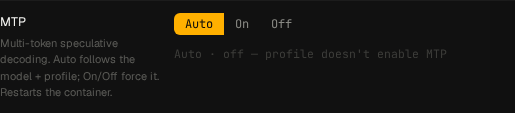
mtpfield is a tri-state:trueforces MTP on,falseforces it off, and unset (Auto) lets the first two decide.
Resolution: an explicit slot override always wins. Under Auto, MTP is enabled
only when the profile opts in and the model is eligible. A non-MTP model
sitting on an MTP profile (e.g. a plain chat GGUF on rocm-moe) no longer
launches with dead --spec-draft-* flags under Auto — if a model’s MTP
capability isn’t picked up by the eligibility heuristic, force the slot’s
override to On explicitly rather than relying on Auto (forcing MTP on a model
with no MTP layers at all makes llama-server refuse to start, so only use the
override for models you know are genuinely MTP-capable).
In the dashboard, the slot Edit drawer (and each stack row) exposes this as a three-way Auto/On/Off control with a live “Auto · active/inactive” hint that explains which of the two Auto conditions — model eligibility or profile opt-in — is failing when MTP isn’t active.
Device and backend: where a slot runs
Section titled “Device and backend: where a slot runs”The device is a slot’s hardware-preference field. It carries hardware intent only — not a provider choice — and is validated at config-load time so a typo fails fast. The valid devices are:
gpu-rocm— the AMD iGPU via ROCm.gpu-vulkan— a GPU via Vulkan (the broad-compatibility path).gpu-cuda— an NVIDIA GPU via CUDA (experimental).cpu— CPU-only execution.npu— the AMD XDNA NPU via FastFlowLM.
device replaced an older overloaded backend field that mixed hardware and
provider identity. Legacy configs that still set backend are auto-promoted to
a device on load (with a deprecation warning), so old slot TOMLs keep working.
Device-to-profile defaults and coherence
Section titled “Device-to-profile defaults and coherence”Each device has a default profile, used by the create-slot picker and by migration:
| Device | Default profile |
|---|---|
gpu-rocm | rocm |
gpu-vulkan | vulkan |
gpu-cuda | cuda |
cpu | cpu-llm |
npu | flm |
Because a slot carries both a device and a profile, the two must stay
coherent — a gpu-vulkan device paired with a ROCm profile would be a
contradiction. hal0 reconciles them when a slot is created or updated so the
reported backend follows the device, and the seed profiles above are the
starting point that keeps a fresh slot consistent.
The NPU trio
Section titled “The NPU trio”The AMD XDNA NPU is driven by FastFlowLM (FLM), and one detail shapes how hal0
uses it: a single flm serve process serves three modalities at once —
chat, speech-to-text, and embeddings. hal0 calls this the NPU trio.
There is one containerized NPU slot. Its chat role routes through the slot’s
upstream like any other slot. The other two modalities ride as shadow slots
— stt and embed — whose requests are posted straight to the same
container’s port when their slot records are enabled. There’s no second process
and no separate model server: the three endpoints are the same FLM process
answering on one static port.
Because the XDNA hardware context admits only one NPU LLM at a time, hal0
enforces NPU exclusivity: you can’t enable a second device=npu chat slot. When
the NPU container isn’t dispatchable, trio requests degrade with a clear
npu.trio_unavailable error rather than failing obscurely.