Slots
A slot is hal0’s unit of served inference: one named place that runs one model. Behind every slot is a single podman container, and around every slot is a lifecycle the platform manages for you. Slots are what the dispatcher routes to, what the GPU arbiter coordinates, and what capabilities and profiles configure — so they are the central concept in hal0.
One slot, one container
Section titled “One slot, one container”Each slot is backed by a systemd template unit named
hal0-slot@<name>.service whose ExecStart runs podman run. That launches
exactly one container — hal0-slot-<name> — serving one model on a loopback
port. The container runtime defaults to podman; the unit uses --replace so a
restart never trips over a stale container name, and publishes its port on
127.0.0.1 only.
The SlotManager owns this. It renders the unit, starts and stops it,
tracks state, and registers the running container as an internal upstream so the
dispatcher can forward to it. A slot is configured by a small TOML file that
supplies the model, context size, and port; the container image and tuned flags
come from the slot’s profile.
Pinning a slot to one GPU
Section titled “Pinning a slot to one GPU”On a multi-GPU host, a slot’s gpu_index (an integer, 0 and up) pins it to a
single card instead of the default “all GPUs” behaviour. The env or device
mapping it emits is backend-specific:
| Device | What gpu_index does |
|---|---|
gpu-rocm | Sets HIP_VISIBLE_DEVICES and ROCR_VISIBLE_DEVICES to the index. |
gpu-vulkan | Sets GGML_VK_VISIBLE_DEVICES to the index. |
gpu-cuda | Maps only that GPU in via CDI (--device nvidia.com/gpu=<n>) and sets CUDA_VISIBLE_DEVICES=0 inside the container, since the CDI mapping already exposes just the one card as ordinal 0. |
Leaving gpu_index unset (the default) targets every GPU the backend can see,
unchanged from single-GPU behaviour. Any explicit [server].env entry you set
still wins over the derived visibility variables — they’re merged underneath,
never over.
The lifecycle state machine
Section titled “The lifecycle state machine”A slot moves through an explicit set of states. The SlotState values are also
the wire representation streamed to the dashboard, so what you see is a real
transition, not a systemd snapshot:
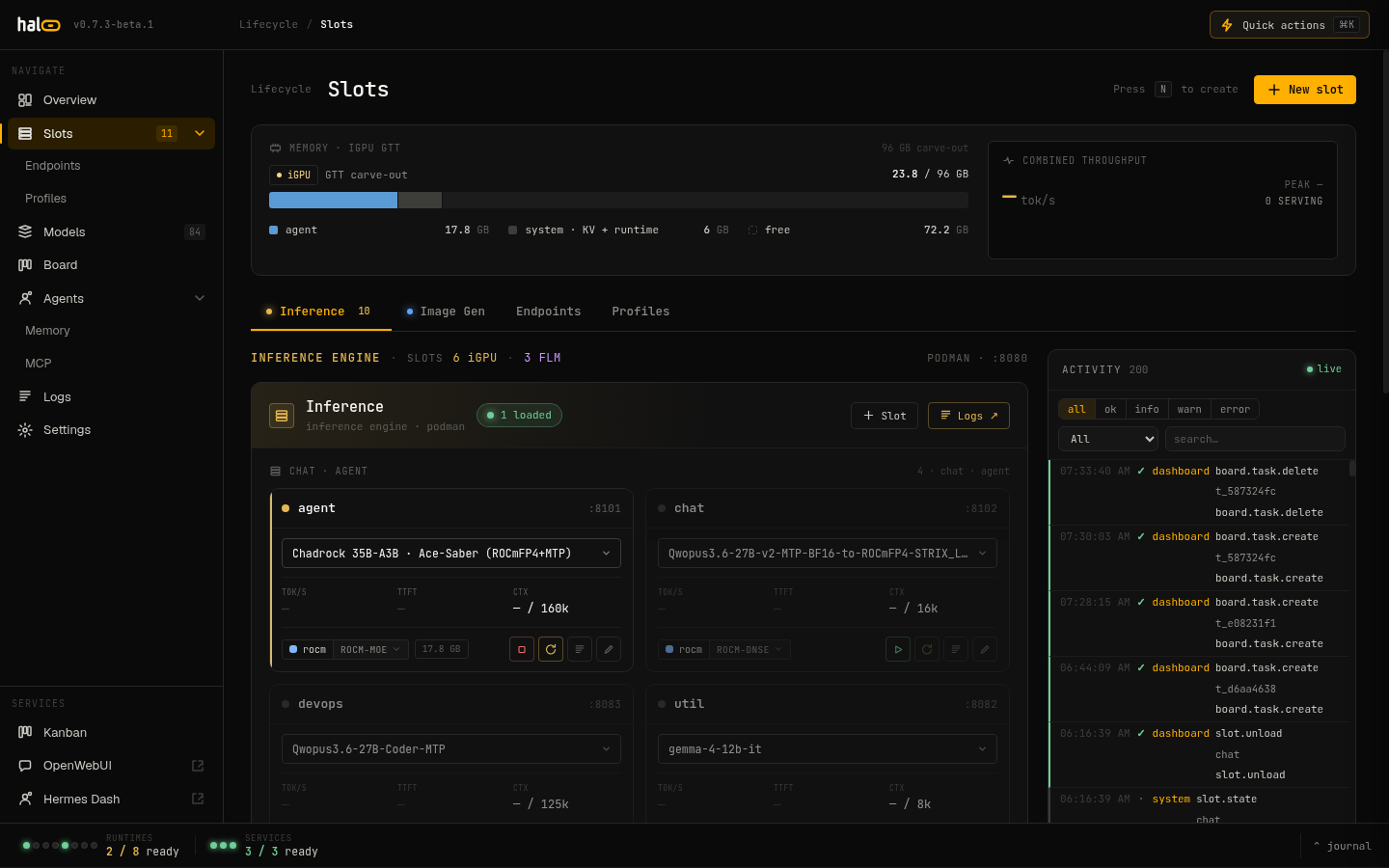 The slot lifecycle transitions visualized.
| State | Meaning |
|---|---|
offline | Not running; no active unit. |
pulling | Model files are downloading or being verified. |
starting | The unit has started; waiting for the container to come up. |
warming | Container is up; the model is loading into the GPU/GTT pool. |
ready | Health probe passed; ready to serve. |
serving | A request is actively in flight. |
idle | Up but not serving — either warm-but-quiet, or up with no loadable model. |
unloading | Graceful shutdown in progress. |
error | Failed; details in state.json and the journal. |
Transitions are constrained — only legal edges are allowed — and persisted
atomically so a dashboard reader never observes a half-written state. The
dispatchable “ready set” is ready, serving, and idle: those are the
states a request can be routed to. Any other state means the slot is
mid-lifecycle, and the dispatcher returns a structured slot.loading 503 with a
Retry-After hint rather than failing with a raw connection error.
Serving and idling
Section titled “Serving and idling”When the dispatcher forwards a request to a slot, it wraps the call in the
slot’s serving state: the first concurrent request moves the slot
ready/idle → serving, and the last one to finish moves it back to ready.
For a streamed response, the slot stays serving until the stream drains. A
background idle monitor demotes a quiet ready slot to idle after its idle
timeout (300 seconds by default), so the dashboard can distinguish “warm and
working” from “warm but quiet.”
Single-flight dispatch
Section titled “Single-flight dispatch”Two safety mechanisms keep concurrent traffic from colliding:
- Per-slot lock. Load, unload, and restart for a given slot serialize behind one lock, so two requests can never race to start or swap the same slot’s container.
- Coalesced prefetch. When the dispatcher needs to fetch a cold upstream’s model list, identical concurrent fetches share a single execution — a hundred simultaneous requests for the same uncached model trigger one upstream call, not a hundred. They all receive the same result (or the same error).
The effect is that a burst of requests for a model that isn’t loaded yet produces exactly one load, and everyone waits on that load rather than starting their own.
Keeping the launch command honest across updates
Section titled “Keeping the launch command honest across updates”A slot’s systemd unit bakes its launch argv at load time — updating hal0
changes the code that would render a slot’s command, but not the unit file
that already rendered it. Left alone, a slot that was running before an
update keeps running the pre-update flags through systemctl restart,
crash-restarts, and even reboots, until something forces a fresh render.
hal0 now closes most of that gap automatically: after an update finishes (and
during install.sh’s update flow), it re-renders every existing slot’s unit
file through current code and issues one daemon-reload. Crucially, it
never bounces a running unit to do this — a slot that’s already serving
keeps serving on its old argv; the fresh command only takes effect the next
time that slot starts, whether that’s a manual restart, a crash-restart, or a
reboot. A slot whose fresh render is byte-identical to what’s on disk is
skipped as a no-op, and a per-slot render failure is logged and skipped rather
than aborting the update.
That still leaves a window — a slot that hasn’t restarted since the update
is running old argv and there’s no way to tell just by looking at it. The
dashboard closes that window with a resolved-command drift indicator:
each slot card compares the container’s actual, live podman inspect argv
against a fresh render from current config across the flags that matter most
(context size, model, alias, batch/ubatch size) and flags a mismatch. Seeing
drift on a slot you haven’t touched is the cue that it’s still running an
older command and could use a restart.
The GPU arbiter
Section titled “The GPU arbiter”The reference hardware has a single iGPU sharing one unified memory pool, so two GPU workloads can’t both hold their weights at once. The GPU arbiter makes that exclusivity explicit. It sorts GPU-backed container slots into two groups — an llm group (GPU chat/embedding slots) and an img group (the ComfyUI image-generation slot) — and only one group may hold the GPU’s memory at a time. NPU and CPU slots are never arbitrated; they don’t contend for the iGPU.
When the GPU is in image mode, the arbiter refuses to dispatch to an llm-group
slot: that request gets a structured gpu.image_mode 503 (with a Retry-After)
instead of silently failing. The image container itself stays resident — what’s
exclusive is the GPU memory, not the container — so switching modes is fast.
After the image slot has had no jobs for its configured idle window
(idle_restore_minutes, 60 by default; 0 means manual-only), the arbiter
frees the diffusion models and restores the LLM slots it had stopped. If the
image slot still has an in-flight generation job when the idle window elapses,
the restore defers rather than unloading it mid-render — a long video render
simply pushes the LLM restore back until it finishes.
Dedicated embed and rerank lanes
Section titled “Dedicated embed and rerank lanes”embed and rerank each get their own bench-tuned profile and their own
podman container — they are never combined on one llama-server instance.
That’s a hard constraint, not a style choice: passing both --embedding and
--reranking to the same llama-server yields all-zero scores. Reranking is
provisioned as its own slot, internally named embed-rerank, distinct from
the embed slot it’s paired with in the capability catalogue.
Both lanes are tuned for how pooled scoring actually works: -ub 8192
matches their batch size because a pooled embedding or rerank pass has to run
the whole input in one physical micro-batch — a smaller ubatch truncates or
fails on longer inputs. On a gpu-rocm box, the embed and rerank
capabilities derive onto these dedicated lanes automatically, whether you’re
running the fresh-install picker or reconciling a capability change later;
Vulkan and CPU boxes still fall back to the generic vulkan/cpu-llm
profile until backend-specific embed/rerank variants ship.
MTP: an Auto / On / Off decision, not a switch
Section titled “MTP: an Auto / On / Off decision, not a switch”Multi-token prediction (speculative decoding against the model’s own draft heads) is resolved from three independent signals, in this order:
- Model eligibility — does the model actually ship MTP heads? hal0 checks
the registry’s
mtptag or anmtpmarker in the model’s id/filename. - Profile opt-in — does the slot’s profile enable MTP at all? Only the
rocm-dnseandrocm-moeseed profiles do. - Slot override — the slot’s own
mtpsetting, a tri-state: forced On, forced Off, or Auto (the default, shown as the middle position of the dashboard’s Auto/On/Off control in the slot drawer).
An explicit slot override always wins. Left on Auto, MTP only turns on when the profile opts in and the model is actually eligible — so a plain chat model dropped onto an MTP profile no longer launches with dead speculative-decoding flags. Because eligibility now gates Auto, a real MTP-capable model that isn’t tagged and has no name marker won’t speculate until you tag it or force the slot On.
Forcing On for a model that turns out to have no MTP heads is a launch
crash waiting to happen (context type MTP requested but model doesn't contain MTP layers), so hal0 defuses that specific combination rather than
letting it recur: swapping a forced-on slot onto an ineligible model clears
the override back to Auto, and an update sweeps existing slot configs for the
same stale combination. A forced Off, or a forced On that’s actually
eligible, is left alone either way.
Seeded slots, roles, and aliases
Section titled “Seeded slots, roles, and aliases”Every install starts with a set of seeded slots so the common capabilities have a home before you create anything:
utility, embed, rerank, stt, tts, img, vision, and agent.
When the NPU runtime (FLM) is present, two more shadow slots are seeded:
stt-npu and embed-npu (riding the NPU chat anchor’s own npu slot).
Seeded slots are reserved — you can’t create a conflicting name or delete them.
The two canonical LLM roles are agent (the capable default — the
dispatch fallback anchor every routing chain ends in) and utility (the
cheap helper, seeded on every install so tasks like memory extraction always
have a cheap local model to target). chat and primary are retired as
slot/role names — the chat capability itself is unaffected, since any
type: llm slot can serve it.
Each slot carries a type (llm, embedding, reranking, transcription,
tts, or image) and a device preference (gpu-rocm, gpu-vulkan,
gpu-cuda, cpu, or npu — gpu-cuda is the experimental path for
non-Strix-Halo NVIDIA hosts). hal0 keeps one back-compat alias so older
callers keep working:
agent-hermes resolves to agent. Aliases are never written to disk and
never appear in slot listings — they’re a transparent translation at dispatch
time.
Addressing a slot by its name (e.g. model: "agent") is the stable way to pin
a co-resident model: the name doesn’t change when you swap the underlying
model file. hal0 also advertises three virtual model names that resolve to
whichever slot is actually loaded — hal0/agent, hal0/utility, and
hal0/npu — and generalizes the pattern to any enabled type: llm slot: a
custom slot named research is addressable as hal0/research even though
it isn’t one of the three advertised names.
Stacks — declarative slot bundles
Section titled “Stacks — declarative slot bundles”A stack is a preconfigured slot + profile + model bundle you can apply atomically: activate a “Daily driver” (chat + voice + image) in one move, and hal0 reconciles the running slots to match. Stacks carry the same portable export / import envelope as profiles, so you can snapshot a working layout and move it to another box. Missing models are flagged before you apply. See Stacks for the full model — the TOML shape, apply semantics, and the portable export/import envelope.