Stacks
Editing slots one at a time works, but swapping an entire lineup — the
agent model, the utility model, their profiles, MTP settings, the embed
and rerank lanes that ride along with them — is tedious to do by hand, and
easy to leave half-applied. A stack is a single named entry that bundles
a whole set of slot assignments together with the profile and model metadata
those assignments reference, so the bundle is self-contained and portable to
another machine. Applying a stack replaces your running slot lineup with
exactly what the stack describes, in one guarded operation.
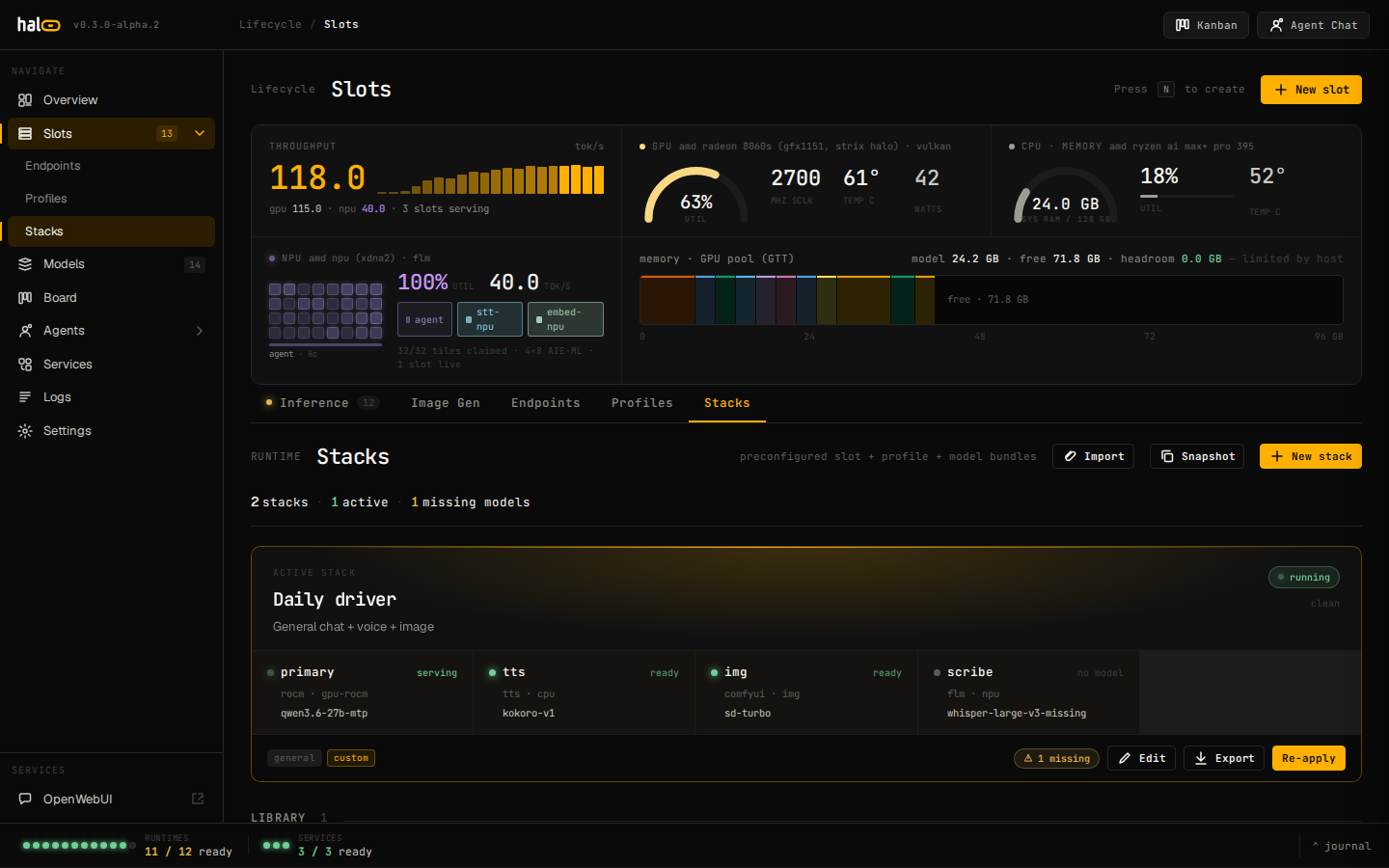
What’s in a stack
Section titled “What’s in a stack”A stack is one [stack.<slug>] entry in /etc/hal0/stacks.toml, managed
exclusively through the /api/stacks router (there is no hal0 stack CLI
command — see Editing multiple slots at once:
Stacks for
the operator-facing walkthrough).
At the top level, a stack carries name, description, author, icon,
tags, a schema_version it was written against, and an hal0_version
provenance stamp. The bulk of a stack is its slot rows — one entry per
slot the stack manages, each shaped like a slot-edit-drawer’s worth of
fields:
| Row field | What it captures |
|---|---|
slot | The slot name (existing, or new — created on apply). |
model / profile | References resolved against the stack’s own embedded models/profiles maps. |
device, provider, role | Device class, provider label, and LLM role. |
vision | Whether the mmproj sidecar loads for this row (defaults off — a stack row opts in explicitly, unlike a raw slot, which defaults it on). |
mtp | The tri-state Auto/On/Off override — null inherits the profile’s default. |
enable_thinking, server_extra_args | Same knobs as the slot drawer. |
capabilities | Embed/rerank/stt/tts/vision capability children carried by this row, each with its own device/provider/model/enabled. |
A stack also embeds a transport-safe copy of every profile and model it references, so importing it onto a fresh host doesn’t depend on that host already having the right profile or registry entry.
Seed stacks
Section titled “Seed stacks”hal0 ships three built-in stacks tuned to the reference Strix Halo roster,
each pairing an agent and a utility slot and carrying dedicated embed and
rerank rows so memory recall works out of the box:
saber— a MoE agent model on therocm-moeprofile (MTP on) paired with a Vulkan utility model.forge— a coding-focused agent/utility pair, both MTP-enabled onrocm/Vulkan.pi— a Raspberry Pi-agent-oriented pairing, utility onrocm, agent on Vulkan.
Like seed profiles, the three seeds are immutable — applying a change to one is rejected; clone it under a new name to customize it.
Applying a stack: plan, then converge
Section titled “Applying a stack: plan, then converge”Applying a stack runs in two phases, and neither one can leave your platform in a state a manual edit couldn’t also produce:
-
Plan and commit. For every row that names a model against a slot that already exists, hal0 computes the resulting slot config and routes it through the exact same guarded pipeline every other slot writer uses — device/profile coherence, NPU exclusivity, default-uniqueness. A row that would fail that pipeline (say, a Vulkan device under a ROCm profile) is rejected and reported, but doesn’t abort the rest of the apply — one bad row never blocks the others. The result commits atomically.
-
Converge. With the config committed, hal0 walks the live slot set and brings it in line: each primary slot is loaded (if offline), swapped (if running the wrong model), or left alone (if already correct) — a slot that’s mid-lifecycle (pulling, starting, warming, unloading) is never interrupted. Each enabled capability child (embed, rerank, stt, tts, vision) is applied the same way. Finally, every dispatchable slot the stack doesn’t mention gets unloaded.
That last step is what makes applying a stack a declarative replace, not a merge: whatever isn’t in the stack goes dark. Any per-slot or per-capability failure during convergence is recorded rather than raised, so a single runtime hiccup never unwinds the config you already committed.
Drift: is the running config still what you applied?
Section titled “Drift: is the running config still what you applied?”hal0 tracks which stack is active and fingerprints the slot configuration at the moment it was applied. Comparing that fingerprint against the live config on every read gives one of four states:
| Status | Meaning |
|---|---|
none | No stack has ever been applied. |
clean | The live config still matches what was applied, and convergence reported no errors. |
degraded | The config still matches, but convergence hit a per-slot runtime error — the plan is honest, the runtime didn’t fully come up. |
modified | A slot was hand-edited since the stack was applied (or the active stack itself was deleted out from under the pointer). |
Drift is a config-level signal, not a liveness probe — hand-editing a stack’s
slot afterward, even correctly, is enough to flip an active stack from
clean to modified.
Portable: export, import, snapshot
Section titled “Portable: export, import, snapshot”A stack can be exported to a self-contained, checksummed .hal0stack.json
envelope — no secrets, no host paths — and imported on another machine.
Import dry-runs first: it checks the envelope’s schema_version isn’t newer
than what the running hal0 understands, classifies every referenced model as
present / pullable / unresolvable against the local registry, and
reconciles embedded profiles against the local catalog — a local profile of
the same name always wins, so importing a stack never silently overwrites
a profile you’ve already tuned.
You can also go the other direction: snapshot builds a brand-new stack from whatever is actually running right now (live slot TOML plus capability selections), so a lineup you assembled by hand one slot at a time can be captured, named, and shared without retyping it as a stack from scratch.
The dashboard’s Stacks view
Section titled “The dashboard’s Stacks view”The dashboard’s Stacks view has two parts: a full-width Hero card for the currently active stack — one row per slot with its model, profile, device, and the clean/modified drift badge, plus Edit, Export, and Re-apply actions — and a Library grid of every other stack, with Load, Clone, Export, Edit, and Delete affordances (Edit and Delete are hidden for the three immutable seeds). Editing or creating a stack opens a row-by-row drawer: slot name (with a “new slot” chip when it doesn’t exist yet), model, device, a profile picker filtered to the row’s device class, and the same Auto/On/Off MTP control the slot drawer uses — though here it’s shown only when it’s actually relevant to the row (an MTP-eligible model, an MTP-opt-in profile, or an existing override), rather than always-on.