Pull and register models
hal0 keeps a local model registry — a record of every model it knows about, where its bytes live, and what it can do. You populate it two ways: pull from Hugging Face, or register a file you already have on disk.
Pull from Hugging Face
Section titled “Pull from Hugging Face”hal0 model pull qwen3-4bThe argument is either a curated alias (see Choose models) or a model id already in the registry. The CLI starts a background pull on the daemon, then polls and renders a progress bar until the job finishes.
The pull lifecycle
Section titled “The pull lifecycle”A pull is a background job with a small state machine:
queued → running → completed ↘ failed ↘ cancelledThe downloader streams the GGUF straight from
https://huggingface.co/<repo>/resolve/main/<file> into a tempfile,
computing SHA-256 as it goes, then atomically moves it into place and
upserts the registry entry with the size and integrity digest. Because
the temp staging dir lives on the same filesystem as the final path, the
install is a true atomic rename even for multi-GB files.
Before it streams a multi-GB file, hal0 runs a disk-space preflight
against the staging filesystem — measured against what’s still left to
fetch, so a resumed pull only needs room for the remainder. If there
isn’t enough free space it fails fast with a structured
model.insufficient_disk (507) error instead of streaming until the
disk fills up.
When HuggingFace’s LFS metadata advertises an expected SHA-256 for the
file, hal0 compares it against the hash it computed on completion; a
mismatch fails the pull with pull.checksum_mismatch (502). The
completed .part is kept on disk for diagnosis, but its resume sidecar
is dropped so a retry starts a clean download rather than “resuming”
corrupt bytes. Files HF exposes with no advertised hash keep the older
record-only behaviour.
Resuming an interrupted pull
Section titled “Resuming an interrupted pull”If a pull is interrupted — network drop, hal0-api restart, an OOM kill
— it leaves a deterministic .part file in the staging dir plus a small
resume sidecar recording where it left off. The next pull for that model
id picks the partial back up with an HTTP Range request instead of
starting over from zero:
- The sidecar’s ETag is sent as
If-Range, so if the upstream object changed in the meantime the server hands back a full200body and hal0 restarts the download clean rather than splicing mismatched bytes. - The on-disk prefix is re-hashed before the resume continues, so the final SHA-256 still comes out byte-for-byte exact.
- A
.part(and its sidecar) left untouched for more than 24 hours is swept on the next daemon start.
Vision models: the mmproj sidecar
Section titled “Vision models: the mmproj sidecar”A vision-capable pick pulls its multimodal projector (mmproj) as a
second file in the same job, right after the main GGUF — no separate
directory scan needed to find it afterwards. The job’s per-file manifest
carries both entries, but the top-level bytes_downloaded / bytes_total
on the status/SSE payload stay the aggregate across every file, so
existing status/progress consumers don’t need to change.
Progress, status, and cancel
Section titled “Progress, status, and cancel”The CLI handles progress for you, but the underlying API is available directly:
# kick off the pullcurl -X POST http://localhost:8080/api/models/qwen3-4b/pull
# poll statuscurl http://localhost:8080/api/models/qwen3-4b/pull/status
# live SSE progresscurl -N http://localhost:8080/api/models/qwen3-4b/pull/stream
# cancel an in-flight pullcurl -X POST http://localhost:8080/api/models/qwen3-4b/pull/cancel
The status payload carries state, bytes_downloaded, bytes_total,
sha256, path, and (on failure) error / error_code. A multi-file
pull (mmproj sidecar) additionally carries files, a per-file manifest
with each entry’s own bytes_done / bytes_total / sha256. Cancellation
sets a flag the background task observes on the next chunk boundary; the
partial download is unlinked and the job transitions to cancelled.
Pulls are de-duplicated: POSTing a pull for a model already queued or
running returns the existing job handle instead of starting a second
download.
Pull by Hugging Face coordinates
Section titled “Pull by Hugging Face coordinates”To pull a file that isn’t in the curated catalogue, supply the repo and filename in the body. hal0 seeds a registry row for the new id so the dashboard can track progress, then pulls:
curl -X POST http://localhost:8080/api/models/my-qwen-build/pull \ -H 'content-type: application/json' \ -d '{"hf_repo":"unsloth/Qwen3.6-27B-GGUF","hf_filename":"Qwen3.6-27B-UD-Q5_K_XL.gguf","labels":["chat"]}'Search and inspect Hugging Face
Section titled “Search and inspect Hugging Face”hal0 proxies HF’s public search and a per-repo inspector so you can find a model and see its pullable variants without leaving your host.
# free-text search (capped at 20 rows)curl 'http://localhost:8080/api/hf/search?q=qwen3+gguf&type=text-generation'
# inspect a repo: list its GGUF variants + license + README excerptcurl -X POST http://localhost:8080/api/models/inspect \  -H 'content-type: application/json' \  -d '{"hf_repo":"unsloth/Qwen3-8B-GGUF"}'
Inspect returns each .gguf file as a variant with its real LFS byte
size; use a variant’s id (the filename) as hf_filename when you pull.
Register a file already on disk
Section titled “Register a file already on disk”If the bytes are already on the host — say you dropped a GGUF into the model store — register it without re-downloading:
hal0 model register qwen3-4b-q4_k_m \ --path /path/to/qwen3-4b-instruct-q4_k_m.gguf \ --name "Qwen3 4B Q4_K_M" \ --license Apache-2.0The file must be readable by the hal0-api process; hal0 records metadata,
it does not copy or chown. The API also exposes a one-shot
“add by path” flow (POST /api/models/add-from-path) and a directory
scan (POST /api/models/scan) that auto-detects capabilities and backends
from each file.
List, inspect, and remove
Section titled “List, inspect, and remove”hal0 model listhal0 model list --jsonAggregates the local registry with everything advertised by configured
upstreams. Local files win on id collision and are flagged installed.
Every row also carries an explicit origin — local (bytes actually on
this host) or upstream (only advertised by a remote provider’s
/v1/models, never pulled) — so the dashboard’s Models list can badge
upstream-only rows Upstream · remote instead of guessing from
installed/upstream alone. A tag a composite upstream advertises
before its weights are genuinely on disk (an FLM slot-default tag, for
example) is dropped from the catalogue rather than shown as a
pullable-but-fake row; the dedicated FLM probe re-adds it once it’s
actually installed.
The dashboard’s Models catalogue can also be sorted (name / size / params
/ added-date, independently within each section — installed, catalogue,
your pulls, upstream) and filtered by tag chips drawn from the curated
tag vocabulary. Every registered GGUF also carries a quant field (e.g.
Q4_K_XL) extracted from the GGUF header at registration time, surfaced
as a filterable chip alongside the tags.
hal0 model show qwen3-4bhal0 model show qwen3-4b --jsonhal0 model rm qwen3-4bRemoves the registry row (confirm prompt; --force to skip). The bytes on
disk are never touched — that’s your call. If a slot has this model as its
default, the API cascades: it unloads the slot and clears the default.
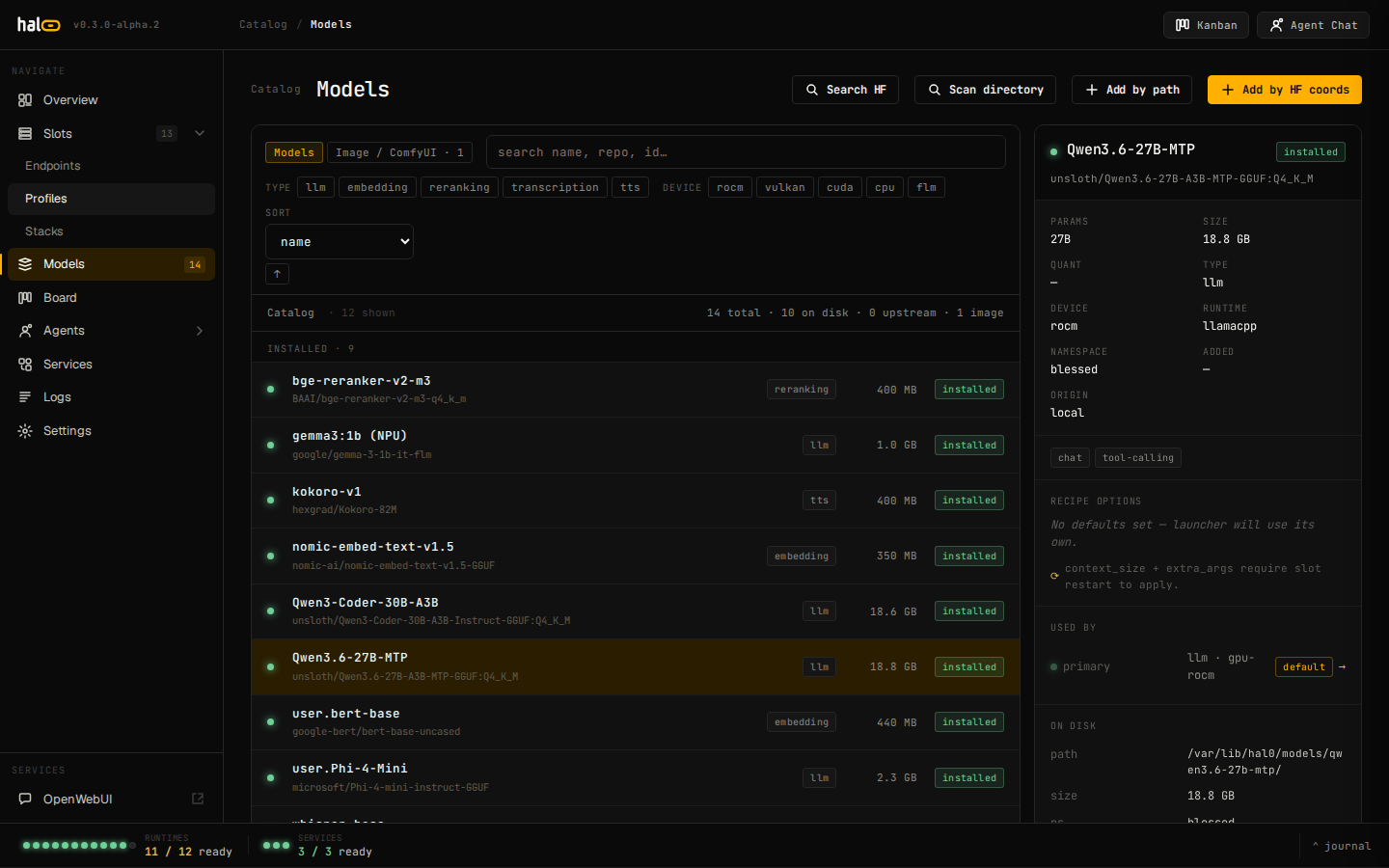 The Models tab lists every installed and upstream-advertised model, with pull-state badges for in-flight downloads.
Assign a model to a slot
Section titled “Assign a model to a slot”hal0 model assign qwen3.5-9b --slot chatThis sets the slot’s default model but does not load it — follow with
hal0 slot load chat (see
Manage slots).
Preferred profile
Section titled “Preferred profile”A registry model can also declare a preferred profile — the runtime
profile it wants loaded alongside it — under defaults.profile:
curl -X PUT http://localhost:8080/api/models/qwen3.6-27b \ -H 'content-type: application/json' \ -d '{"defaults": {"profile": "rocm-moe"}}'A slot adopts this preference automatically: when it’s created bound to
the model with no explicit profile of its own, and again on every
subsequent model swap. The preference is honoured only when it’s
compatible with the slot’s existing device and type — an incompatible
preference is ignored and the slot keeps its current/device-default
profile; hal0 never flips a slot’s hardware to satisfy a model’s
preference. The dashboard’s model editor surfaces this as a
preferred profile selector in the model’s Recipe pane (filtered to
profiles that fit the model’s backends/device/type), with
None (use slot default) when there’s no preference set.
The registry on disk
Section titled “The registry on disk”Registry entries are metadata records — id, display name, path, size, SHA-256, capabilities, launcher defaults (including an optional preferred profile), and the Hugging Face coordinates a pull came from. The registry is the source of truth the dispatcher resolves model ids against; the actual weights live in your configured model store.