Enable memory
hal0’s memory subsystem is gated by a single environment flag,
HAL0_MEMORY_ENABLED. When it’s on, hal0 gives agents a persistent recall
store — Hindsight — plus an optional knowledge-graph extraction layer.
Flipping the flag is a single environment change — no code change, no
reinstall.
Hermes ships with its own durable-memory wiring already pointed at this
subsystem (memory.provider=hal0-memory, two banks — private:hermes and
shared) — see What memory powers
for how that fits together. Hermes’s memory calls still need
HAL0_MEMORY_ENABLED=1 on the hal0-api side to actually work; without it they
degrade the same as every other caller.
Turn it on
Section titled “Turn it on”-
Set the flag. Add
HAL0_MEMORY_ENABLED=1to/etc/hal0/api.env:Terminal window echo 'HAL0_MEMORY_ENABLED=1' | sudo tee -a /etc/hal0/api.env -
Restart the API so
create_appconstructs the memory provider:Terminal window sudo systemctl restart hal0-api -
Confirm it’s wired. The graph status endpoint now responds with real state instead of degrading:
Terminal window hal0 memory graph status
When the flag is set, hal0 builds the memory provider from your config. The engine is Hindsight; if the Hindsight daemon is unreachable at startup, hal0 logs a warning and degrades to an in-memory PgVector fallback rather than failing startup.
The graph-extraction gate
Section titled “The graph-extraction gate”Storing recall items is one thing; running an LLM over them to extract a
knowledge graph is heavier and separately gated, and it’s off by default
even on a fresh install. Control it with the hal0 memory graph sub-app (a
thin client over /api/memory/graph).
Hindsight builds its graph natively from whatever local llm slot you point it
at — there’s no external-upstream routing anymore. That slot is
[memory.graph].extraction_slot in hal0.toml (default "utility");
changing it repoints Hindsight’s extraction LLM and restarts hindsight-api
to apply it.
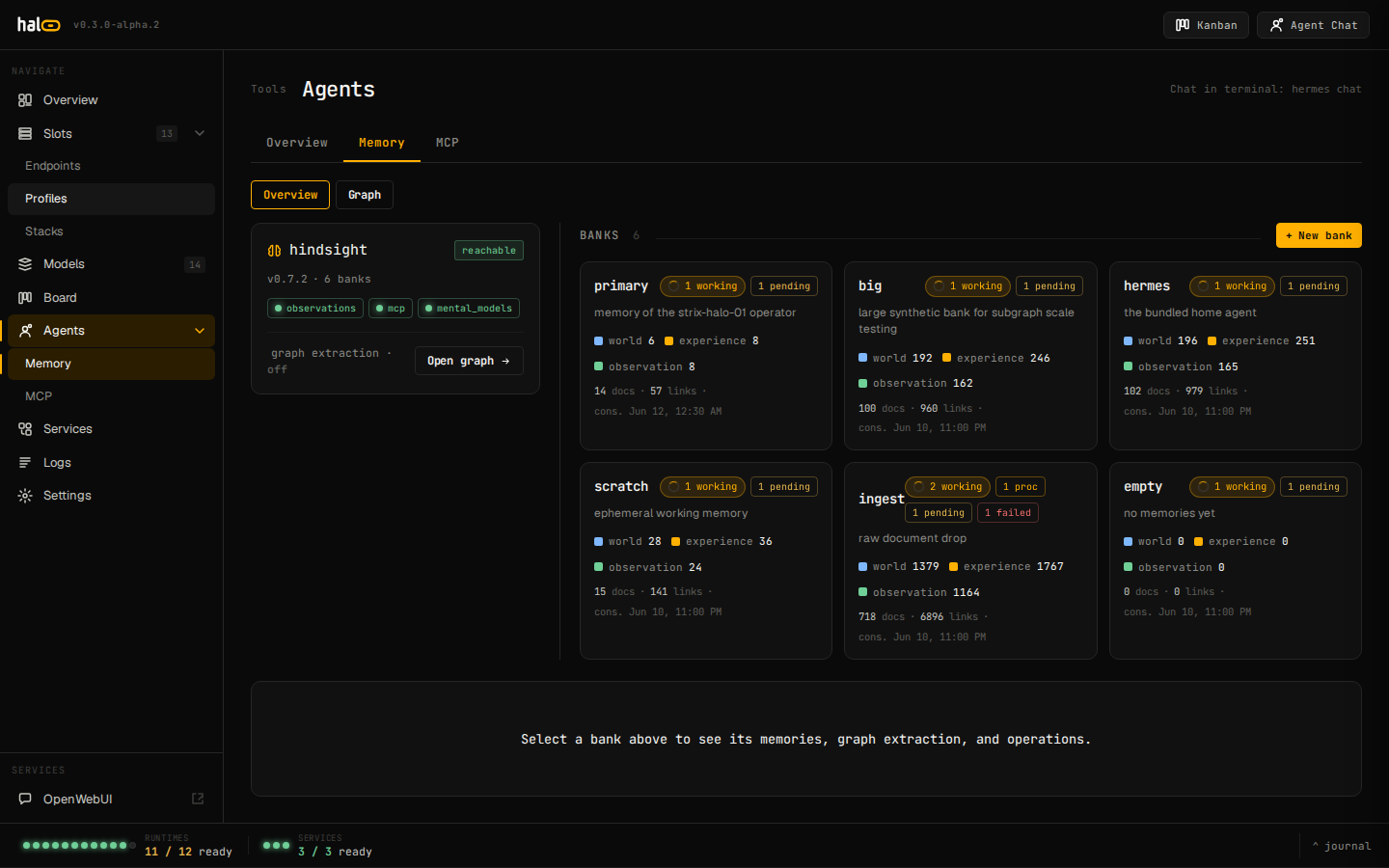 Live memory and graph-extraction dashboard in hal0.
hal0 memory graph statushal0 memory graph status --jsonShows whether extraction is on, the configured extraction slot (and whether it currently resolves to a live enabled llm slot), the available slots you could pick instead, and counters (builds OK, errors, in-flight, last build / error).
# turn extraction on, keeping the current extraction slothal0 memory graph enable
# turn extraction on and repoint it at a specific local slothal0 memory graph enable --slot utilityhal0 memory graph enable --slot agent
--slot names a local type=llm slot; it must already be enabled — the
server validates the choice against the live enabled-slot set and rejects an
unknown or non-llm slot before it ever reaches hal0.toml. On success it
restarts hindsight-api so its extraction LLM actually follows the change.
Omit --slot to flip enabled without touching the current slot.
hal0 memory graph disableTurns extraction off and cancels any in-flight build. Vector recall is unaffected either way — this gate only controls the graph layer.
Migrate a legacy store
Section titled “Migrate a legacy store”If you previously ran the Cognee-backed memory store, preview a migration into Hindsight banks:
hal0 memory migrate --dry-runhal0 memory migrate --dry-run --cognee-dir /var/lib/hal0/memory/cogneeThe report shows rows total / mapped / unmapped and whether it’s a no-op.
Destructive ops are audited
Section titled “Destructive ops are audited”Every destructive call under /api/memory/* — bank delete, and the
memories / config / document / directive / operation / mental-model delete
routes, plus the namespace POST /api/memory/delete used for id-scoped
deletes — records a durable audit row (actor, target, and a truthful
outcome) so a memory wipe is attributable after the fact. Deleting a whole
bank additionally requires
an explicit confirmation that echoes the bank id back, via ?confirm=<bank_id>
(or {"confirm": "<bank_id>"} in the body) — a plain DELETE with no
confirmation is rejected with memory.confirm_required.
Related
Section titled “Related”- Run agents — agents are the main consumer of the memory store.
- MCP tools — the
memory_*tool tiers and the/mcp/memoryserver this guide’s flag gates.