Generate images
hal0 generates images through ComfyUI, a node-graph Stable-Diffusion
runtime. It runs as one containerized generation engine — a single
run loads many cooperating models at once — using the
kyuz0 Strix Halo ComfyUI image
(docker.io/kyuz0/amd-strix-halo-comfyui), tuned for the AMD iGPU.
Because there is exactly one iGPU, image generation is mutually exclusive with the LLM stack: only one of them can hold GPU memory at a time. hal0 models this as a switchover driven by the GPU arbiter — the ComfyUI container stays resident, only its model memory is freed and reloaded.
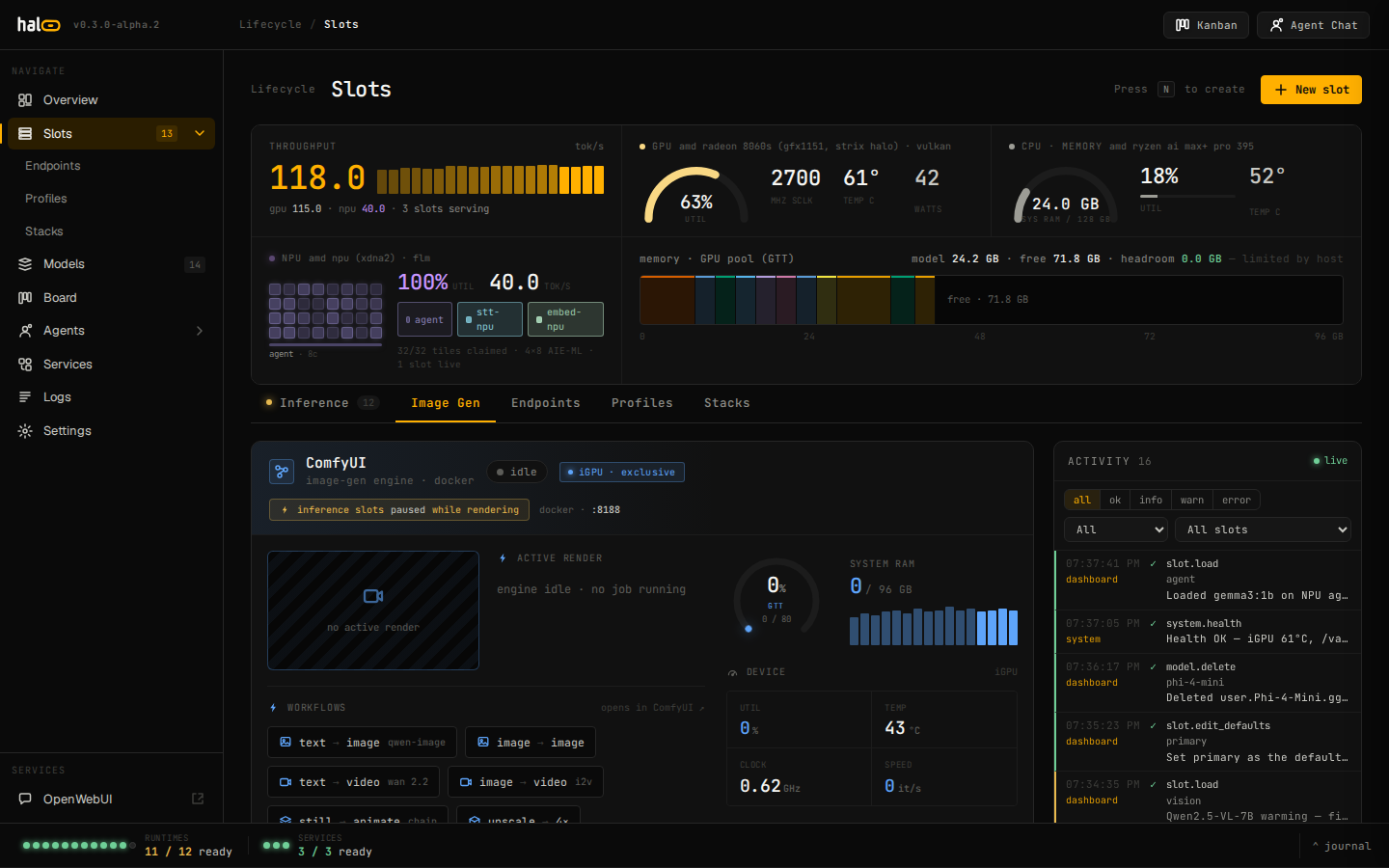 The Image-Gen tab: engine state, GPU memory gauges, queue, and switchover controls.
Read the generation-engine status
Section titled “Read the generation-engine status”The dashboard’s Image-Gen tab renders from a read-only aggregator that folds container state, the LLM-owner check, and ComfyUI’s own HTTP API into one object:
curl http://localhost:8080/api/comfyui/statusKey fields:
mode—generation(ComfyUI owns the iGPU) orinference(the LLM stack owns it). The GPU arbiter is the source of truth.engine—running,generating(a render is in flight),starting(container up, port not bound yet), orstopped.reachable— whether ComfyUI’s HTTP API answers.container— theimgslot container’s state (running/exited/absent).memory— GTT and RAM gauges from ComfyUI’s/system_stats.queue—{running, pending}job counts.switchover— the in-flight switch tracker (active,target,error) so a poll can render “switching…”.
Every probe degrades to a safe default: a dead engine surfaces as
stopped, never a 500.
Switch the iGPU between modes
Section titled “Switch the iGPU between modes”The img slot runs as the hal0-slot@img.service systemd unit. To hand
the iGPU to ComfyUI (drains and unloads the LLM GPU slots, then ensures
the resident container is up):
curl -X POST http://localhost:8080/api/comfyui/switchover \ -H 'Content-Type: application/json' \ -d '{"mode": "generation"}'To hand it back to inference (frees ComfyUI’s models via ComfyUI’s own free path — the container and web UI stay up — then reloads the saved LLM slots):
curl -X POST http://localhost:8080/api/comfyui/switchover \ -H 'Content-Type: application/json' \ -d '{"mode": "inference"}'Body fields:
| Field | Type | Notes |
|---|---|---|
mode | string | generation or inference (required). |
force | bool | Switching to inference drops any running/pending render. Without force, a busy queue is refused with 409. |
pin | bool | generation only — hold image mode against the arbiter’s idle-restore. |
Responses: 202 (switching, runs in the background — poll the
switchover block on /status), 200 (noop, already in the target
mode), 409 (switch already in flight, or a busy queue without
force), 503 (comfyui.arbiter_unavailable — the GPU arbiter is not
wired on this host).
Pin or unpin image mode independently:
curl -X POST http://localhost:8080/api/comfyui/pin \ -H 'Content-Type: application/json' \ -d '{"pinned": true}'Enable the switchover
Section titled “Enable the switchover”Both write paths (/switchover and /pin) require the GPU arbiter to be
wired — that is, hal0-api must be running with a configured img slot so
the slot manager attaches the arbiter at startup. Without it both endpoints
return 503 (comfyui.arbiter_unavailable). See
Manage slots for how to add and enable the
img slot.
Image models in the Models view
Section titled “Image models in the Models view”The dashboard’s Models view keeps image-gen models off the
dispatcher-facing catalog entirely — a segmented toggle switches between
Models (chat/embed/rerank/stt/tts, the models the dispatcher can
route a request to) and Image / ComfyUI. There’s no image filter
chip on the Models tab any more; image lives on its own tab instead.
The Image / ComfyUI tab only ever lists installed checkpoints — same
rule as FLM/NPU models, an un-pulled image model is never advertised
there — grouped by the ComfyUI models-tree subdirectory each one actually
landed in (checkpoints, loras, vae, upscale_models, …), derived
straight from the on-disk path under .../comfyui/models/<subdir>/.
A model registers as ComfyUI (owned_by: "comfyui", comfyui tagged
into backends) no matter which path added it — a curated pull, “add by
path”, or a directory scan all tag it consistently. GET /api/models
also self-heals any row an older hal0 build mis-tagged (for example
capabilities: ["chat"] with empty backends) by re-deriving its
ComfyUI category from the path on every list call — the fix isn’t
persisted back to the registry, it just re-applies on read, so no
migration is needed.
Generate an image
Section titled “Generate an image”The OpenAI-compatible endpoint translates your request into a ComfyUI workflow, runs it, and returns the result in OpenAI’s shape. The route flips the GPU to image mode before dispatching, so a single call also performs the switchover when needed.
curl -X POST http://localhost:8080/v1/images/generations \ -H 'Content-Type: application/json' \ -d '{ "model": "sdxl-turbo", "prompt": "a cat in a hat, studio lighting", "n": 1, "size": "1024x1024", "response_format": "url" }'Request fields honoured:
| Field | Default | Notes |
|---|---|---|
model | sdxl-turbo | Must be a model in the curated image-gen catalogue — sdxl-turbo, sd-1.5-pruned-emaonly, and sdxl-lightning ship today. |
prompt | — | Required. Empty prompt → 422 (image.prompt_required). |
n | 1 | Batch size, capped at 8. |
size | slot default | WxH, e.g. 1024x1024. Falls back to the img slot’s [image] default_size. |
response_format | url | url or b64_json. |
A hal0 extension extra_body accepts seed, steps, cfg, and
negative_prompt.
A model that isn’t in the curated image catalogue returns 404
(image.model_not_curated).
The response is the OpenAI image shape:
{ "created": 1716000000, "data": [ { "url": "/api/images/cache/<uuid>.png" } ], "_hal0": { "...debug meta from the workflow translator..." }}With response_format: "b64_json" each data entry carries a base64 PNG
in b64_json instead of a url.
To cancel an in-flight or queued render (clears ComfyUI’s queue and interrupts the current job):
curl -X POST http://localhost:8080/api/comfyui/render/cancelThis is best-effort — network hiccups talking to ComfyUI are swallowed, so
poll /api/comfyui/status to confirm the queue actually drained.
Quick-launch workflows
Section titled “Quick-launch workflows”The Image-Gen tab also ships a workflow quick-launch strip: a row of
curated chips (text-to-image, image-to-image, a couple of video flows, an
upscale placeholder) that deep-link straight into ComfyUI’s own UI rather
than going through /v1/images/generations. Any workflow JSON an operator
drops into the bind-mounted workflows directory shows up next to the
curated chips as a “custom” entry, no rebuild needed.
curl http://localhost:8080/api/comfyui/workflowsReturns {"workflows": [{"name", "source"}, ...]} for every <name>.json
found under /mnt/ai-models/comfyui/workflows (the bind-mounted primary
dir) or ComfyUI’s own user/default/workflows fallback; a name present in
both wins from the primary dir. Launch one of those custom workflows
directly — this posts the saved graph straight to ComfyUI’s own /prompt
endpoint, independent of the OpenAI-shaped generations route above:
curl -X POST http://localhost:8080/api/comfyui/workflows/my-workflow/launchResponds 202 with {"status": "queued", "prompt_id": "..."}, or
404 (comfyui.workflow_not_found) if no <name>.json exists in either
directory.
See also
Section titled “See also”- Manage slots — the
imgslot lifecycle. - Configure — set
[image]slot defaults (default_size,default_steps,idle_restore_minutes— the latter is now hot-reloadable, nohal0-apirestart needed). - Observe the system — tail
hal0-slot@img. - Operate: services — restart the ComfyUI container, view its logs, and advertise it over mDNS from the Services page.